Just bought my wife a 2020 SX and I’ve started investigating cell phone mount options. I typically buy custom mounts for each car as opposed the generic varieties meant to mount to vents or into cup holders. ProClip only offers mounts down along the console, I’d like to have the phone mount right between the center LCD and instrument cluster. I found an Aukey mount that magnetically attaches to a metal plate that is glued down to the top of the dash and has an arm that extends out. But I don’t love the idea of gluing the plate down, and the mount end is magnetic only (and it doesn’t support wireless charging). Anyone found something that works well in that specific space?

-
Hint: Use a descriptive title for your new message
If you're looking for help and want to draw people in who can assist you, use a descriptive subject title when posting your message. In other words, "I need help with my SUV" could be about anything and can easily be overlooked by people who can help. However, "I need help with my transmission" will draw interest from people who can help with a transmission specific issue. Be as descriptive as you can. Please also post in the appropriate forum. The "Lounge" is for introducing yourself. If you need help with your leather interior, please post in the Interior section - and so on... This message can be closed by clicking the X in the top right corner. -

You are using an out of date browser. It may not display this or other websites correctly.
You should upgrade or use an alternative browser.
You should upgrade or use an alternative browser.
Best custom cell phone mount
- Thread author sbergin
- Start date

Humaid
Active member
- Joined
- Sep 12, 2019
- Messages
- 107
- Reaction score
- 37
- Points
- 28
Just bought my wife a 2020 SX and I’ve started investigating cell phone mount options. I typically buy custom mounts for each car as opposed the generic varieties meant to mount to vents or into cup holders. ProClip only offers mounts down along the console, I’d like to have the phone mount right between the center LCD and instrument cluster. I found an Aukey mount that magnetically attaches to a metal plate that is glued down to the top of the dash and has an arm that extends out. But I don’t love the idea of gluing the plate down, and the mount end is magnetic only (and it doesn’t support wireless charging). Anyone found something that works well in that specific space?
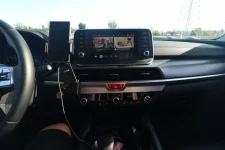
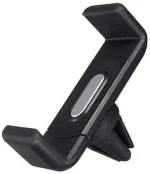
I use exactly the same as below. It fits well there, and holds the phone really good. The good thing about the Telluride is that there are three AC vents under the screen, so I use the one in the middle. I use a short cable to charge the phone, and connect to Android Auto.
I have tried a wireless charger vent mount. However, it was bulky, plus actually I don't need the wireless charger since my phone has to be connected by cable to run Android Auto.

anotherlostmonkey
Active member
- Joined
- Mar 5, 2021
- Messages
- 132
- Reaction score
- 143
- Points
- 43
I had the same struggle. The vent based ones blocked too many buttons. Didn't love the idea of a windshield or gluing one to the dashboard. Ultimately I went with the ProClip. It covers the emergency flasher button, but you can still reach it. At least with my phone it doesn't block the info screen.
______________________________

Kao
Well-known member
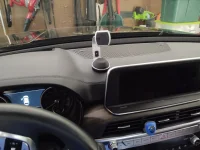
I bought this one at Costco. Suction cup mount with magnet to hold the phone in place. Suction cup mount allows you to move it around dash. You stick an adhesive thin magnet plate to back of phone and it holds really well. Can't use it if you have other handles or things attached to your phone.Just bought my wife a 2020 SX and I’ve started investigating cell phone mount options. I typically buy custom mounts for each car as opposed the generic varieties meant to mount to vents or into cup holders. ProClip only offers mounts down along the console, I’d like to have the phone mount right between the center LCD and instrument cluster. I found an Aukey mount that magnetically attaches to a metal plate that is glued down to the top of the dash and has an arm that extends out. But I don’t love the idea of gluing the plate down, and the mount end is magnetic only (and it doesn’t support wireless charging). Anyone found something that works well in that specific space?
Attachments
Last edited:

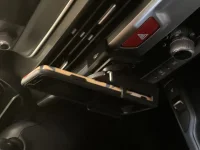
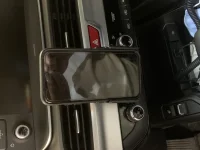
I installed the ProClip in mine. As you can see from the pics, it is not on the console but below the LCD. I have had custom ProCilp mounts in my last 5 cars with no complaints. Also, a 6" wire works perfect for CarPlay as well.
Attachments
Humaid
Active member
- Joined
- Sep 12, 2019
- Messages
- 107
- Reaction score
- 37
- Points
- 28
It will cover the emergency flasher button as anotherlostmonkey pointed out. But, still you can reach it.Thanks Humaid. I was really looking to go BETWEEN the screen and instrument cluster, not under the screen. Seems like too many controls could be blocked where you suggested?

superk1977
Well-known member
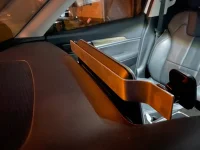
I wanted more storage and a place to put my phone so I got this. Seems to work ok so far.

______________________________
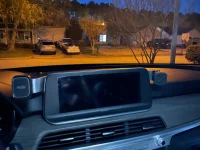
After getting frustrated trying to find a good mounting solution and spending way too much money on vent mounts, dash mounts, and everything in between. I ended up taking a piece of aluminum flat stock and bending it to fit around the infotainment screen. Mounted it to the back of the screen enclosure and putting magnetic mounts on either side.
The phones sit solidly, don't block the view of anything, and are easy to re-position.
The phones sit solidly, don't block the view of anything, and are easy to re-position.
Attachments

Socal949
Well-known member
- Joined
- Feb 24, 2021
- Messages
- 980
- Reaction score
- 434
- Points
- 63
How is it held to the back of the screen? Double sided tape?After getting frustrated trying to find a good mounting solution and spending way too much money on vent mounts, dash mounts, and everything in between. I ended up taking a piece of aluminum flat stock and bending it to fit around the infotainment screen. Mounted it to the back of the screen enclosure and putting magnetic mounts on either side.
The phones sit solidly, don't block the view of anything, and are easy to re-position.
Nicely done! I’ve come to the same conclusion, that a custom solution is the only viable option. Thanks for the photos.After getting frustrated trying to find a good mounting solution and spending way too much money on vent mounts, dash mounts, and everything in between. I ended up taking a piece of aluminum flat stock and bending it to fit around the infotainment screen. Mounted it to the back of the screen enclosure and putting magnetic mounts on either side.
The phones sit solidly, don't block the view of anything, and are easy to re-position.
I used the two sided Command adhesive so it can be removed if neededHow is it held to the back of the screen? Double sided tape?
______________________________

TyBerg
New member
- Joined
- Apr 15, 2021
- Messages
- 3
- Reaction score
- 7
- Points
- 3
Ingenious! You could sell that setup!!After getting frustrated trying to find a good mounting solution and spending way too much money on vent mounts, dash mounts, and everything in between. I ended up taking a piece of aluminum flat stock and bending it to fit around the infotainment screen. Mounted it to the back of the screen enclosure and putting magnetic mounts on either side.
The phones sit solidly, don't block the view of anything, and are easy to re-position.
Do you have any pictures with phones mounted?After getting frustrated trying to find a good mounting solution and spending way too much money on vent mounts, dash mounts, and everything in between. I ended up taking a piece of aluminum flat stock and bending it to fit around the infotainment screen. Mounted it to the back of the screen enclosure and putting magnetic mounts on either side.
The phones sit solidly, don't block the view of anything, and are easy to re-position.

JonFar111
Well-known member
Nice!After getting frustrated trying to find a good mounting solution and spending way too much money on vent mounts, dash mounts, and everything in between. I ended up taking a piece of aluminum flat stock and bending it to fit around the infotainment screen. Mounted it to the back of the screen enclosure and putting magnetic mounts on either side.
The phones sit solidly, don't block the view of anything, and are easy to re-position.
I'd also like to have my phone between the infotainment screen and instrument cluster. Has anyone tried getting a suction cup mount to stick to the back of the infotainment screen? With a goose neck mount, I think the phone would go in the right place. If the suction cup sticks...
______________________________
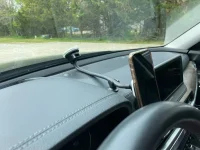
As a matter of fact, this is what my wife found on Amazon and it is pretty much perfect. It's magnetic, but does not charge. She has an iPhone 11, so no built in magnets. The mount included metal plates and we were able to attach one to the inside of her case. Not my first preference, but she's happy with it. Now I just need to figure out how to pull the woodgrain dash panel so I can tuck the wire out of the way...
Here's the Amazon link: https://amzn.to/3eNTxEQ
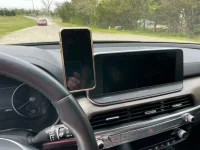
Here's the Amazon link: https://amzn.to/3eNTxEQ

asgalang
Active member
I used the Proclip mount, Proclip extension, and a repurposed MPOW holder to place mine in between the the dash and radio. I worry the silver trim will crack due to the mount (I've seen posts about others' trims cracking without any reason), but so far so good.