• Hint: Use a descriptive title for your new message
    If you're looking for help and want to draw people in who can assist you, use a descriptive subject title when posting your message. In other words, "I need help with my SUV" could be about anything and can easily be overlooked by people who can help. However, "I need help with my transmission" will draw interest from people who can help with a transmission specific issue. Be as descriptive as you can. Please also post in the appropriate forum. The "Lounge" is for introducing yourself. If you need help with your leather interior, please post in the Interior section - and so on... This message can be closed by clicking the X in the top right corner.
  • Car enthusiast? Join us on Cars Connected! iOS | Android | Desktop

Telluride Interior Mods

Can you send me the file and possibly the type of paper? Blends perfectly
 
Can you send me the file and possibly the type of paper? Blends perfectly

Glad you like it! Unfortunately, I am at a loss of trying to grab the design file from the Cricut Design Space - if you know how please let me know.

However, I can share some more details:

What I used:
  • I used a Cricut Explore Air
  • Black Cricut Vinyl (12" x 12" sheet) can be found on Amazon or most local craft supply stores
  • Cutting mat required by the Cricut machines
  • Cricut Transfer tape to lift the small letters off of the cut mat
  • Default cutting knife that came with the Explore
  • PC/tablet able to run Cricut Design Space - in my case I used an iMac running macOS Mojave 10.14.6
Steps to do:
  • Open the Cricut Design Space
  • Choose Upload image - use attached image
  • Edit the attached image to remove all design EXCEPT the Telluride logo (don't forget to white out the small area in the R and the D)
  • Save the image to your design space
  • Create a new project canvas
  • Insert the custom telluride logo
  • make the image as large as your machine supports mine was 9.25" x 6.75"
  • Choose "cut" as the line type and then follow the prompted instructions to finish cutting on your machine.
Hope this helps.
 

Attachments

  • Supper-Suite.webp
    Supper-Suite.webp
    11.8 KB · Views: 35
Looks nice!
______________________________
 
You gave me an idea. I want to put XPEL on the side of my telluride in between the windows. The gloss black portions. I'm going to draw it in cricut and have it cut out the pattern. Genius.
 
Not gonna lie the thought has crossed my mind haha. Not sure how much interest there would be though.
Do something. Figure out the cost for the footage. Then put it for a dollar over. If it is reasonable. Problem would be... Doing it to order would make the cost go up. And if you can do colors... Then people will want them for more than just the telly. I have a beer fridge to collect all sorts of stickers. But dont let my wife find out you can cut vynal. She has a list of 10 stickers she wants to put all over this new car.
______________________________
 
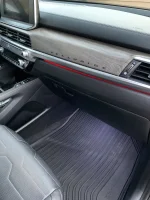
How are your mood red light so bright? Mine doesn’t even turn on until it’s dark- even then it’s really dim.

Hmm not sure. I have my brightness level set on 10. I have noticed some colors are darker than expected. For example, like yellow/white I would expect to be the brightest but turns out Red and Purple seem to be the best for me. Any luck with other colors?
 
How are your mood red light so bright? Mine doesn’t even turn on until it’s dark- even then it’s really dim.

Wondering that as well! My mood lights are pretty much invisible during daytime, and barely visible at night time, even though I made sure they were set to level 10. Changing color didn't improve brightness much either. Seeing that picture, I'll most likely go back to the dealer and request a fix..
______________________________
 
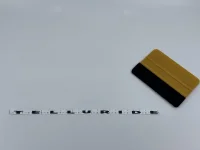
@JABTelluride I made my creation available on eBay for sale! Currently I have only made black - but do have other colors available to make. To cover the initial costs of everything I am looking at about 12.99 with free shipping to the continental 48. If you or anyone else in this forum reads this and messages me on eBay I will give you a near cost to make price for the initial support!

I have 12 black decals ready to go! See the listing here: Custom 2020 Kia Telluride Dashboard Vinyl Logo Decal | eBay
Qg%z4Gy6RfSCUJusk3y8wQ.webp
 
Wondering that as well! My mood lights are pretty much invisible during daytime, and barely visible at night time, even though I made sure they were set to level 10. Changing color didn't improve brightness much either. Seeing that picture, I'll most likely go back to the dealer and request a fix..
It was mentioned on a different post but the lights dim significantly once you shift out of PARK. Check it out
 
It was mentioned on a different post but the lights dim significantly once you shift out of PARK. Check it out

Oh interesting I never really paid attention, in my case (above photos) my vehicle was in park and engine was off.
 
@JABTelluride I made my creation available on eBay for sale! Currently I have only made black - but do have other colors available to make. To cover the initial costs of everything I am looking at about 12.99 with free shipping to the continental 48. If you or anyone else in this forum reads this and messages me on eBay I will give you a near cost to make price for the initial support!

I have 12 black decals ready to go! See the listing here: Custom 2020 Kia Telluride Dashboard Vinyl Logo Decal | eBay
View attachment 6078
I am looking at wrapping some of the pieces if I get that done soon I'll hit you up on this.
______________________________
 
It was mentioned on a different post but the lights dim significantly once you shift out of PARK. Check it out

Indeed, we noticed that a few days ago! They dim quite a lot once you shift in gear. I still can't see the mood lights during the day, unlike the picture mrad31 posted, but at least they appear to be working ok at night.

Also, as soon as any door is open, the ambient lights within the doors all turn off.
 
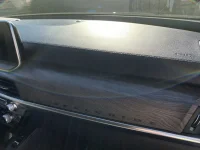
Decided to spruce up the interior of my SXP with some simple lettering cut on Cricut vinyl.
@mrad31 that looks very cool. I'm looking to do some lettering as well with a vinyl cutter. Are you happy with your cricut? Is it fast enough?
I've short listed the Explore Air 2 and for the past few weeks they were out of stock. How much time did it take to cut the telluride in vinyl?
I've heard that bundles are big money savers. After going through a dozen or so sites i've found this explore air bundle. Should I get the everything bundle or the starter is sufficient. Any tips or pointers are welcome.
 
@MalcomFer overall I'm pretty happy with the Cricut. Their software is a bit easier to use than Cameo for example. I've used both and prefer the Cricut. It's not blazing fast takes about 1 minute per decal which is 10" in length. I bought mine so many years ago but all you really need to do the vinyl is the machine itself, a couple blades (no need to score the vinyl), something like a small spatula or butter-knife (the Cricut tools are a bit overpriced IMO) and definitely some good transfer tape. The machine should come with a sampler of materials and a cut mat. So ultimately it is obviously up to you and what you plan to do with machine. Like if you plan to have a lot of color variety then sure a starter pack would be the way to go as Cricut's vinyl is any where between $8-$12 a roll at the local craft store. Amazon has a lot of good quality, like OEM, products to use on the machine and that is where I actually purchased mine as well as Oracle vinyl and replacement parts.


Back
Top