• Hint: Use a descriptive title for your new message
    If you're looking for help and want to draw people in who can assist you, use a descriptive subject title when posting your message. In other words, "I need help with my SUV" could be about anything and can easily be overlooked by people who can help. However, "I need help with my transmission" will draw interest from people who can help with a transmission specific issue. Be as descriptive as you can. Please also post in the appropriate forum. The "Lounge" is for introducing yourself. If you need help with your leather interior, please post in the Interior section - and so on... This message can be closed by clicking the X in the top right corner.
  • Car enthusiast? Join us on Cars Connected! iOS | Android | Desktop

Disable auto-dimming

itschris

FOUNDING MEMBER
Joined
Apr 13, 2019
Messages
136
Reaction score
73
Points
28
Is there a way to turn off auto-dimming of your screen? I find it really distracting the way the screen is constantly dimming then go bright or how it actually goes to dark mode just going under an overpass. Super annoying. I checked and it does seem to be an option which might be the crappiest thing ever. Why wouldn’t you let the driver decide? I hope I’m wrong about this
 
I haven't seen any options to disable it.
Its been bothering me as well, its one thing for the infotainment to dim but its incredibly annoying that the gauges dim as well.

Maybe the solution is to cover up the sensor completely so it doesn't adjust anything.
 
Last edited:
I haven't seen any options to disable it.
Its been bothering me as well, its one thing for the infotainment to dim but its incredibly annoying that the gauges dim as well.

Maybe the solution is to cover up the sensor completely so it doesn't adjust anything.

I thought about that... but I was thinking that would make the "dark" theme on all the time I believe. I'm not even all the mad about it switching from light to dark theme-wise, but I can't stand the constant switching of the in between. It also shouldn't be that sensitive that if i'm next to a semi it changes. it's so dumb. Such a meaningless change to the settings. Every car I've owned that has a screen allowed you to select light, dark, or auto mode.
 
Is there a way to turn off auto-dimming of your screen? I find it really distracting the way the screen is constantly dimming then go bright or how it actually goes to dark mode just going under an overpass. Super annoying. I checked and it does seem to be an option which might be the crappiest thing ever. Why wouldn’t you let the driver decide? I hope I’m wrong about this
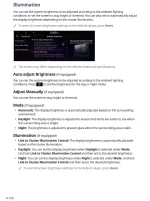
try adjusting these settings

19361293-B563-49C5-9858-50627C2D6894.webp
______________________________
 
Its very disappointing that the 2023 doesn't have that option, seems like a vey big oversight and a step backwards. I have an SX, maybe higher trims have the option? That would be pretty ridiculous though since the infotainment is the same.

There is a sliver of hope here.
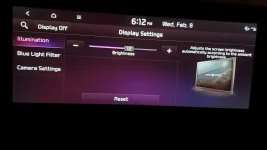
In the Illumination section it says "Adjusts the screen brightness automatically according to ambient brightness"

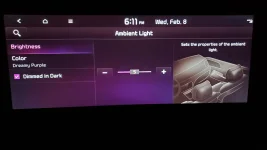
The Ambient Light section has a "Dimmed in the Dark" option that can be unchecked. I'm hoping that the two are connected and this is Kia's convoluted way of giving us the option to turn off auto dimming.
 

Attachments

  • 20230208_181124.webp
    20230208_181124.webp
    54.8 KB · Views: 19
  • 20230208_181226.webp
    20230208_181226.webp
    52.5 KB · Views: 20
try adjusting these settings

I should have been more clear. This is the issue with the 23's. I'll be better going forward about year/trim on posts like this. But that was like the screen on my 2020 SX if I remember right, but for some reason they changed/killed this control on the new models.

@Maxton - I don't think the trim level matters. I have an SX X-Line and it's the same. I see no reason a Prestige package would add that. I understand what they're trying to do but it makes no sense to remove the option. I'm usually driving just after the sun comes up around 7:30 to 8:30 or so. Trees which partially block the light intermittently cause my screen to constantly dim and return. It's in my peripheral vision but I'm bit amazed at how much it bothers me. It's just one of those really really annoying things that was completely unnecessary.
 
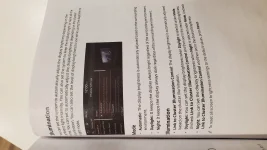
That was a screenshot taken from the 23’ infotainment manual. So that would mean the manual is already outdated or incorrect.

23MY Telluride AVN5Wide QSG.pdf
Okay... now I'm bit perplexed. I'm wondering if there's something else selected that changes what options you have. I'll go back to the drawing board later tonight. Thanks for that info
______________________________
 
Its very disappointing that the 2023 doesn't have that option, seems like a vey big oversight and a step backwards. I have an SX, maybe higher trims have the option? That would be pretty ridiculous though since the infotainment is the same.

There is a sliver of hope here.
In the Illumination section it says "Adjusts the screen brightness automatically according to ambient brightness"

The Ambient Light section has a "Dimmed in the Dark" option that can be unchecked. I'm hoping that the two are connected and this is Kia's convoluted way of giving us the option to turn off auto dimming.
No go on this. My dimmed in the dark box was already unchecked.
 
I double checked in my manual and the setting is supposed to be there. I reached out to Kia and sent them pictures of my screen, their response was very unhelpful. They responded with:

"Good morning, thank you for your valued feedback. under the display settings you should have the option to turn off the automatic adjustments. "

Great customer service!

This really leaves me with two options:

1) The infotainment is out of date. I see there is an update available so I plan to download it as soon as the downloader is working. Maybe my car shipped with old software. Odd thing is, when I typed in my software version into the downloader it did not recognize it. Maybe a good sign? Luckily it recognized the model number.
2) If the update doesn't fix it, I plan to take it to the dealer and let them figure it out.
 

Attachments

  • 20230209_172413.webp
    20230209_172413.webp
    118.9 KB · Views: 6
I double checked in my manual and the setting is supposed to be there. I reached out to Kia and sent them pictures of my screen, their response was very unhelpful. They responded with:

"Good morning, thank you for your valued feedback. under the display settings you should have the option to turn off the automatic adjustments. "

Great customer service!

This really leaves me with two options:

1) The infotainment is out of date. I see there is an update available so I plan to download it as soon as the downloader is working. Maybe my car shipped with old software. Odd thing is, when I typed in my software version into the downloader it did not recognize it. Maybe a good sign? Luckily it recognized the model number.
2) If the update doesn't fix it, I plan to take it to the dealer and let them figure it out.
Maybe we’ll get this figured out together. I leave for a business trip in the morning so I won’t have time to screw with it on my end. The more I think about it, I really think I remember there being more options on that screen other than just how bright you want it to be. Why do only that when you have a physical adjustment left if your steering wheel? I’m wondering if something happened and it somehow reverted back to a more rudimentary software package or went into some different mode. I’m wondering if this kind of thing could be responsible for my blind spot indicators to stop working or only randomly work half ass.

Let us know what happens when you do the new download. Thanks brother. I appreciate you.
 
Any luck ? I have a kia carnival sx with same issue. I swear before I updated the infotainment system I had option to turn on and off auto brightness
______________________________
 
Is there a way to turn off auto-dimming of your screen? I find it really distracting the way the screen is constantly dimming then go bright or how it actually goes to dark mode just going under an overpass. Super annoying. I checked and it does seem to be an option which might be the crappiest thing ever. Why wouldn’t you let the driver decide? I hope I’m wrong about this
I have a 24 sx and I can not stand the switch between dark and light map


Back
Top